
101 Guide to Software Testing
Business
15/12/25
Read time: 14 min

The shift from volume to value keeps evolving – 67% of businesses have already incorporated quality assurance into their core. This trend is expected to grow even further through the coming decade, thus, ensuring the highest software testing quality is more relevant than ever.
To help you navigate the software testing topic, we compiled an end-to-end guide based on Engipulse experience. Keep reading to learn about the types of software testing, phases of quality assurance, and the top tools to simplify testing software.
What Is Software Testing?
Software testing is the process of ensuring the high quality of the product, be it an application, a website, or any other type of software. The whole software testing process is based on specific requirements and functions you expect from your future product. This means the quality assurance engineer should check whether your software complies with all requirements and applicable standards, including web accessibility regulations.
The software testing process consists of identifying bugs, errors, and other malfunctions to fix them before your product is released to the market. Though software testing may take additional time and costs, in the long run, it will save you time on live-product fixes.
Why Is Software Testing Important?
There are numerous benefits software testing can bring to your business. And there’s no doubt it’s true – you get better product quality, reduce development costs and risks, and improve security by introducing quality assurance to the development process.
Software testing also allows you to detect architectural and design flaws early, preventing technical debt and costly reworks. Besides, you’ll also get a product that is easier to scale and maintain over time.
In-Depth Look at Types of Software Testing
Let’s now take a closer look at the types of testing in software to make sure you can opt for the one that best fits your tech and business requirements.
Manual vs. Automated Testing
When considering types of software tests, the division into manual and automated types of quality assurance must be the first thing coming to your mind. Each of the approaches has its pros and cons, so below, you can find a detailed review of each.
Manual Testing
At its core, manual testing is a thorough analysis of your product by a testing engineer. In the case of manual testing, your software testers won’t write any additional software to automate the testing process, they will only use test cases, a predefined set of instructions.
Basically, the process is as follows:
- It all starts with an initial review of your app/platform/website. Imagine a curious user who tries to use all of your functionalities and make sense of all the interactions available, e.g. buttons, forms, menus, etc. – that’s how a software tester runs this quality assurance step.
- Checking for and detecting malfunctions is the next step. At this point, your QA engineer will test whether your product functionalities work appropriately. Oftentimes, they’ll use test cases as guidance on the features that need to be tested.
- Reporting and logging the detected bugs and errors so developers can fix them.
Automated Testing
Unlike manual testing, automated software testing presupposes the use of software tools for running pre-written test cases. This enables you to save time and make the process of development testing more efficient.
Let’s now check out the automated testing process:
- It all starts with writing test scripts. QA engineers will write software scripts for testing specific cases.
- Once the software scripts are ready, your software testing experts can launch them. In simple words, the software scripts will interact with your application just like a testing engineer would. However, it happens instantly, saving you hours of work.
- After running automated tests, the software reports the malfunctions back to software developers so they can fix the detected bugs.
In general, automated testing is useful for repetitive tasks, e.g., when you need to test one feature multiple times. At the same time, manual testing offers more flexibility, enabling a deeper level of exploration. Both types of testing in software testing are strong tools that will make sure your product meets the needs of your target users once it enters the market, so don’t hesitate to choose either of the options and gain the benefit for your business.
Detailed Types of Testing
Yet another classification of software testing types is a division of software testing by approaches to the very process. Get more details on each below:
Unit Testing
This type of software testing focuses on checking individual software components or functions. Essentially, unit testing ensures the proper performance of separate features in isolation. Most often, unit tests are run by engineers during the software development process to make sure bugs are caught early on.
System Testing
Unlike unit testing, system testing in software testing examines your application as a whole, taking into account each feature and function. To run system testing, QA engineers will simulate the real-world use of your app taking into account specified requirements and functions.
Integration Testing
Ensuring coordinated operation among modules and components of your software is the key goal of integration testing. This testing type detects issues in the interfaces and verifies the combined parts of the application work as intended.
Acceptance Testing
Run in the pre-production stage, acceptance testing checks whether your software meets the initial requirements and defines whether it’s ready for release. Its core goal is to ensure your software product meets your end users’ expectations and fits its purpose.
After reviewing each type of software testing, you can make an informed decision on which one would make a perfect match for your specific product. If you’re still hesitating about which types of quality assurance would best fit you, you can drop us a line and our experts will get back to you shortly with answers to all of your questions.
Software Testing vs Debugging
Though the terms software testing and debugging are oftentimes confused and considered to be synonymous, the truth is far from that. Regardless of being tightly interconnected, software testing and debugging have different meanings.
Let’s take a closer look at each of the concepts:
Software testing is the process of ensuring the quality of a software product throughout the development process, which is done before the product is released to the market.
Debugging is the very process of fixing the malfunctions and bugs detected during the software testing phase. It also focuses on understanding the root causes of a malfunction to make sure it never recurs after being fixed.
To get even more clear understanding of the differences between the two, we compiled a concise table:
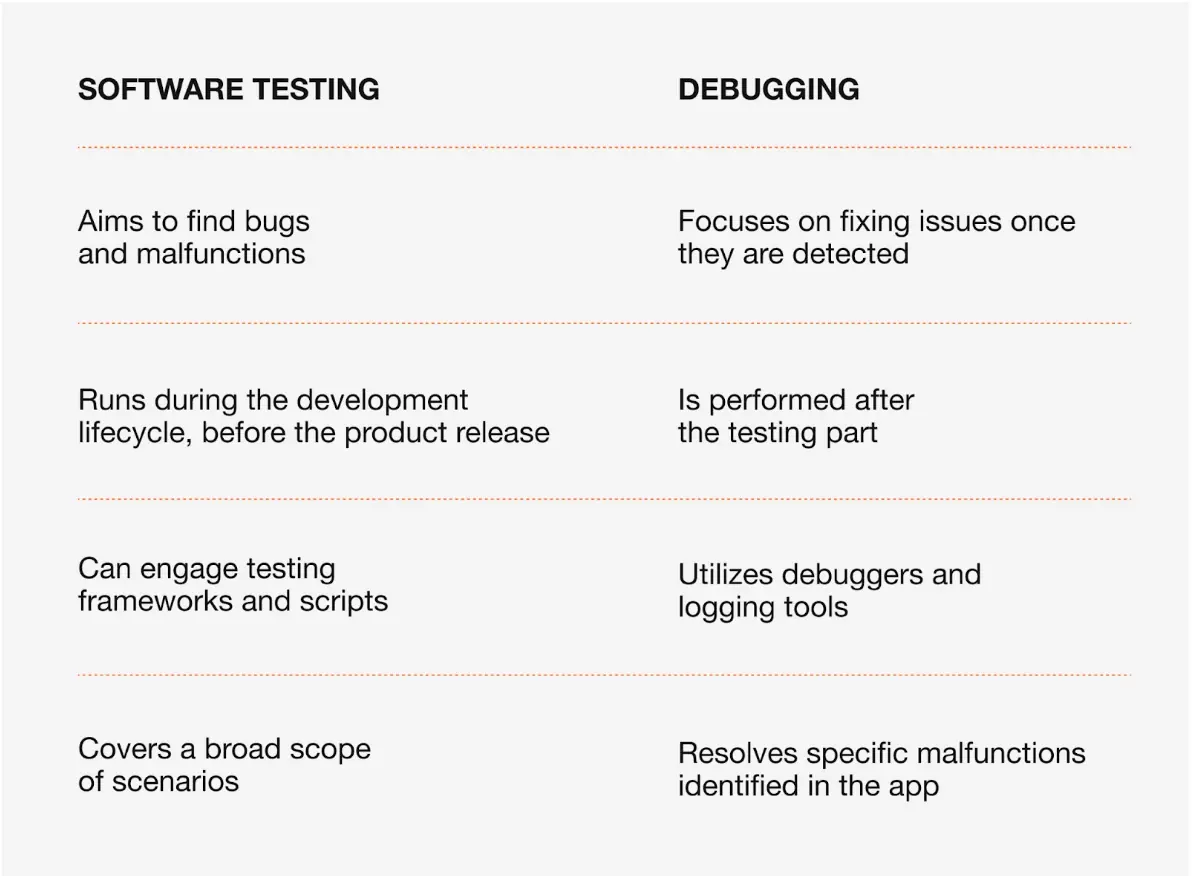
The table above outlines the key differences between software testing and debugging terms, clearing the confusion between the concepts. After considering the types and terms critical in software testing, let’s move on to a no less interesting and important topic, namely – the stages of software testing.
Core Phases of Software Testing
The software testing process is another question you may come up with while considering how to test software. That’s why we also decided to add step-by-step phases of software testing to make sure you can always refer to it when setting up your testing processes.
- Setup Phase
It’s an initial stage of software testing that comprises all the necessary preparations for the testing process, involving the following steps:
- Test environment setup. Covers configuration of hardware, software, and network for proper simulation of the user environment.
- Test data preparation. Collecting all data with potential scenarios necessary for testing the application.
- Execution Phase
At this point, your application is being tested according to your initial requirements.
- Running the tests. Software testing engineers run test case scenarios to check whether your software meets all the requirements and behaves as expected.
- Logging. The process of recording the detected bugs and malfunctions for further analysis.
- Post-Execution Phase
This step focuses on analyzing the discovered testing results and addressing the issues found.
- Result analysis. The test results are checked against the initial requirements, including the features and functionality.
- Bug reporting. Testing experts report the bugs they find to the development team for further fixing.
- Retesting and regression testing. Even after the malfunctions were fixed, retesting is a crucial step to double-check the defined issues are now resolved.
These software testing phases ensure your software product is bug-free before the release. Keep in mind that a structured approach to testing your software is a defining factor for delivering a high-quality product to your end users.
Top 6 Software Testing Tools
Our software testing guide wouldn’t be complete without the tools that simplify and make the software testing process more efficient. Each of the tools has its unique goal, enabling a broad range of software testing applications, from automating the testing process to tracking bugs.
Below, you can find some of the most common software testing tools:
Selenium
Selenium is an open-source tool that enables testing automation. In simple, testers can use this tool for writing automation scripts in a programming language they prefer. The scripts simulate real users’ interactions, helping software testing engineers verify web application functionality.
Jira
Jira is a project management and issue-tracking tool popular among software testers. This tool enables documenting, tracking, and resolving issues. Widely used in agile environments, Jira is a perfect tool for smooth collaboration between software testing experts and software engineers.
Appium
Yet another open-source tool for automating the testing process. However, unlike other tools, Apium specializes in Android and iOS software application testing. The tool enables software testers to write tests for native, hybrid, and mobile web applications using multiple programming languages.
TestComplete
TestComplete is a tool that helps software testers automate various types of testing, including functional and regression testing. User-friendly interface ensures both technical and non-technical users can use this tool seamlessly.
Jenkins
Facilitation of continuous integration and continuous testing is a competitive advantage of this open-source tool. Jenkins enables testing automation on the go, meaning the code can be tested as soon as there’s been a codebase change. This way, the tool ensures faster feedback and more reliable testing results.
Postman
Postman is a tool primarily used for testing APIs. By enabling testers to send requests, validate responses, and automate API test cases, Postman is commonly used for testing RESTful APIs. Its core goal is to ensure proper data exchange between systems.
The tools outlined above play an essential role in the effective software testing process. They enable QA teams to automate testing processes and eventually ensure the delivery of high-quality software products. By selecting the right tools for specific testing needs, organizations can ensure a smoother and more reliable development cycle.
Conclusion
Testing in software development is something bigger than just a step – it’s a guarantee of your product quality and end-user satisfaction. By choosing the types of testing that best fit your product, and mastering its phases, your team can build an application that provides a top-notch user experience.
With the Engipulse 101 guide, you’re now equipped with all the necessary knowledge to approach software testing with confidence. If you still would like to get more information about software testing methods and approaches that will fit your specific needs — don’t hesitate to drop us a line and get guidance from our experts.
FAQ
What stage of the product development process assesses a product’s compatibility in the market?
The acceptance testing stage of software testing assesses a product’s compatibility in the market. Check out more about acceptance testing.
Can automated testing fully replace manual testing?
No, automated testing cannot fully replace manual testing. Though automated testing is a good way to cut time and resources on routine testing tasks, it won’t cover exploratory testing, requiring manual engagement.
How do I choose the right testing tool for my project?
Choose testing tools based on your product and business specifics. If you still hesitate about which tools would best fit your requests, don’t hesitate to drop us a line and our experts will get back to you shortly with software testing help.